Best Dive Computer in 2026
The Shearwater Peregrine at $580 is the best dive computer for most divers: full colour screen, two button interface, air, nitrox and gauge modes, and a sealed wirelessly charged body. The Suunto Zoop Novo at $299 is the best first computer, and the Shearwater Teric at $1,199 is the technical pick.
A dive computer is the only piece of gear on your body that is doing arithmetic while you are busy looking at a turtle. It tracks depth, time and inert gas loading continuously and tells you how long you can stay and how fast you may come up. Every other item in a dive kit is a convenience or a comfort by comparison. For most divers the answer is the Shearwater Peregrine at $580, because it puts a legible colour screen and a two button interface in front of you and then gets out of the way.
A dive computer is a wrist or console instrument that measures ambient pressure, converts it to depth, times your exposure at each depth, and runs a decompression model to produce a no-stop limit, an ascent rate warning and a surface interval. It replaces the printed dive table, and it does so continuously rather than in ten foot brackets, which is where the extra bottom time comes from.
Best dive computers by experience level

Cressi Donatello Dive Watch Computer
A single button watch computer with air, nitrox, gauge and freedive modes and a user changeable battery. The cheapest way into a computer you own rather than rent.
Best for: A first computer where budget is the binding constraint
Skip it if: Anyone who expects Bluetooth logging or a colour screen at this price

Cressi Leonardo 2.0 Dive Computer
One button, one screen, air and nitrox to 50 percent. It does less than anything else here and that is the point: nothing to mis-set on a boat deck.
Best for: Warm water recreational diving on a tight budget

Suunto Zoop Novo Wrist Dive Computer
The computer a very large number of dive shops rent out, which means the interface is one your instructor can already teach. Four modes, user replaceable battery, and a display large enough to read without reading glasses.
Best for: A first computer bought straight after open water certification

Suunto D5 Dive Computer
Colour screen, changeable straps and optional wireless tank pressure. The interface is a step up from the Zoop in both looks and menu depth.
Best for: Divers who want colour and air integration without Shearwater money

Garmin Descent G1 Dive Computer
A monochrome memory-in-pixel screen with a very long battery life, multiple dive modes including closed circuit, and the full Garmin activity tracking on the surface. The screen is the compromise that keeps the price down.
Best for: Divers who want Garmin surface features without a colour screen price

Shearwater Research Peregrine Dive Computer
A full colour screen, a two button interface that stays readable in a surge, and Shearwater firmware that most technical divers already trust. Air, nitrox and gauge modes, with wireless charging instead of a battery hatch to flood.
Best for: The diver who wants one computer for the next ten years

Shearwater Research Tern TX Dive Computer
The compact Shearwater. Watch sized with a colour AMOLED screen, air integration for two transmitters, and the same firmware and interface as the Perdix line at a smaller physical size.
Best for: Divers who want Shearwater firmware on a normal sized wrist
Skip it if: Recreational divers who will never run a second gas or a transmitter

Shearwater Perdix 2 Ti Dive Computer
The large screen technical standard: titanium body, air integration, open and closed circuit, trimix, and a screen you can read through a flooded mask at depth.
Best for: Technical and cold water divers who want maximum legibility
Skip it if: Divers with small wrists, and anyone who only dives air and nitrox
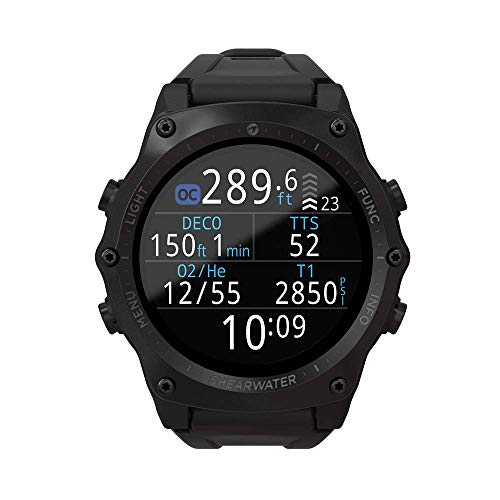
Shearwater Research Teric Dive Computer
A watch sized Shearwater with full trimix and closed circuit support, vibration alerts and wireless air integration for up to two transmitters. Genuinely more computer than recreational diving requires.
Best for: Technical divers, and recreational divers who will later become one
Skip it if: A first computer, at any budget, for a diver still inside recreational limits
Specifications are the manufacturer's published figures, compared against verified owner reviews. Prices and stock change constantly, so confirm on the retailer page. Cards without a single listing link to a scoped search because that model is sold through dive shops. As an Amazon Associate we earn from qualifying purchases.
What does a dive computer actually do that a table cannot?
A printed table treats your whole dive as if you spent all of it at the deepest point you touched. That is a safe simplification and an expensive one. If you drop to 80 feet for four minutes at a wreck and then spend the remaining thirty minutes at 40 feet, the table charges you for a 35 minute dive at 80 feet. A computer samples depth every few seconds and loads and offgasses your modelled tissue compartments against the depth you were actually at.
The gap is large. On PADI Recreational Dive Planner air limits with no repetitive dive, 80 feet gives you 30 minutes and 40 feet gives you 140. A computer on that same multi level profile routinely returns twenty to forty minutes of extra no-stop time. Those figures differ between agencies and between algorithms, sometimes by a wide margin, and your own computer supersedes any table you have read anywhere, including here.
A computer also does three things a table never did. It shows your ascent rate live, against the standard maximum of 30 feet per minute, which is the single most commonly violated number in recreational diving. It counts down the 3 minute safety stop at 15 feet. And it logs the dive, which matters when a charter operator asks how recently you dived to 100 feet.
Which dive computer should most divers buy?
The Shearwater Peregrine at $580. It is the point in this category where the screen stops being a compromise. The colour LCD is readable at a glance in green water and through a partially flooded mask, the two button interface is short enough to learn in one dive, and the layout puts depth, dive time and no-stop time in the three places your eye already goes.
The deeper reason is the firmware. Shearwater runs Bühlmann ZHL-16C with gradient factors you can see and set, which means the conservatism is a number you choose rather than a hidden manufacturer decision. It is the same interface language used on the technical units, so a diver who later moves to a Perdix 2 Ti at $895 is not relearning anything. The body is sealed and charges wirelessly, which removes the battery hatch that is the most common flood path on a wrist computer.
What it does not do is worth stating plainly. The base Peregrine has no trimix, no closed circuit mode and no air integration. For a recreational diver on air and nitrox those are three absences you will never notice. Over ten years at 25 dives a year, $2.32 per dive is the whole cost of the decision.
How much does a dive computer cost, and where does the money go?
The working range on this page is $200.67 to $1,399.99. The money buys four things in a fairly predictable order: screen, gas handling, connectivity and body.
Under $300, you get a monochrome segment display, one or two buttons, air and nitrox to somewhere between 50 and 99 percent oxygen, and a user changeable battery. The Cressi Donatello at $200.67 and the Cressi Leonardo 2.0 at $224.95 are honest examples. Nothing is missing that keeps you safe inside recreational limits.
Between $300 and $600 you buy legibility and logging. The Suunto D5 at $348.99 adds colour, the Garmin Descent G1 at $449.99 adds full surface activity tracking and a very long battery life, and the Peregrine adds the screen and the firmware that make it the pick. The step from a $299 Zoop Novo to the Peregrine is $281.00, and almost all of it is display quality and interface.
Above $700 you are buying capability that recreational diving does not use: trimix, closed circuit rebreather support, multiple transmitters, and in the case of the Garmin Descent Mk3i at $1,399.99, an entire multisport watch wrapped around the dive computer. The step from the Peregrine to a Teric is $619.00, and the honest description of that money is convenience, size and headroom rather than safety.
| Computer | Price | Screen | Gas support | Air integration | Battery |
|---|---|---|---|---|---|
| Cressi Donatello | $200.67 | Segment LCD | Air, nitrox, gauge, free | No | User replaceable |
| Cressi Leonardo 2.0 | $224.95 | Segment LCD | Air, nitrox to 50 percent | No | User replaceable |
| Suunto Zoop Novo | $299 | Segment LCD | Air, nitrox, gauge, free | No | User replaceable |
| Suunto D5 | $348.99 | Colour LCD | Air, nitrox, gauge, free | Optional | Rechargeable |
| Garmin Descent G1 | $449.99 | Monochrome MIP | Air, nitrox, trimix, CCR | Optional | Rechargeable |
| Shearwater Peregrine | $580 | Colour LCD | Air, nitrox, gauge | No | Wireless charge |
| Shearwater Tern TX | $795 | Colour AMOLED | Air, nitrox, gauge | 2 transmitters | Rechargeable |
| Shearwater Perdix 2 Ti | $895 | Colour LCD | Air, nitrox, trimix, CCR | Yes | User replaceable |
| Shearwater Teric | $1,199 | Colour AMOLED | Air, nitrox, trimix, CCR | 2 transmitters | Rechargeable |
Screen type, gas support and battery format are the manufacturers' published specifications. Prices were checked and will move, so confirm before ordering.
Does the decompression algorithm matter?
A decompression algorithm is a mathematical model of how quickly inert gas moves into and out of body tissues at pressure. It is a model, not a measurement. No computer can see nitrogen in your blood; it infers loading from depth and time using compartments with assumed half times.
Three families cover almost everything sold. Bühlmann ZHL-16C with gradient factors is what Shearwater runs and what most technical divers prefer, because the two gradient factor numbers make the conservatism explicit and adjustable. Suunto Fused RGBM and the Mares and Oceanic variants apply bubble model penalties that tend to shorten no-stop time, particularly on repetitive and reverse profiles. Oceanic units let you pick between two algorithms outright.
The practical consequence is that two divers doing the identical profile side by side can see materially different no-stop times, and the more conservative computer is the one the pair must follow. That is a real planning issue on a buddy team and a real annoyance on a liveaboard where everyone else is on a more liberal unit. It is not a reason to buy a liberal computer. It is a reason to dive one computer consistently and to understand what it is being conservative about.
None of this changes the underlying arithmetic of pressure. At 33 feet of sea water you are at 2 ata and breathing gas at twice the surface rate. At 66 feet it is 3 ata and three times, and at 99 feet 4 ata and four times. That relationship is physics, and it is identical on every computer on this page.
Do you need air integration?
Air integration means a transmitter on the first stage high pressure port sends cylinder pressure to the computer, so depth, no-stop time and remaining pressure appear on one screen. Better implementations also compute a gas time remaining figure using your live breathing rate.
It is genuinely useful and genuinely expensive. A Shearwater Swift transmitter is $445 on its own, so a Peregrine TX style setup lands around $1,025.00 before you have bought a regulator. Transmitters are brand locked, so the Oceanic transmitter at $399.95 will not talk to a Shearwater and vice versa. Buy the transmitter against the computer you own, never the other way round.
Two cautions. First, a gas time remaining figure is a projection from your recent breathing rate, and it does not know that you are about to swim into current. Second, a wireless link can drop, so an air integrated diver should still carry a mechanical submersible pressure gauge. Work out your real consumption with the SAC rate calculator rather than trusting a projection, and remember that a psi per minute figure only applies to the cylinder it was measured in.
How does the computer change the way you plan gas?
It does not remove the plan. It checks it. A computer tells you the decompression status of your body; it says nothing at all about how much gas is in your cylinder unless you have paid for air integration, and even then it cannot decide when your dive ends.
That decision is rock bottom: the volume two divers need to get from depth to the surface while sharing one gas supply, with a minute at depth to solve the problem, an ascent at 30 feet per minute, and 3 minutes at 15 feet, all priced at an elevated breathing rate because a diver who has just run out of gas is not relaxed. At 100 feet in an aluminium 80 that comes to roughly 33 cubic feet, or about 1,300 psi. That is the pressure at which the dive is over, not a number to swim past. The gas planning calculator works the arithmetic, and it is arithmetic a trained diver checks rather than a plan.
Nitrox is the other place the computer earns its keep. Set the mix in the computer before every dive, because the computer cannot smell the gas. EAN32 at a 1.4 ata working ppO2 has a maximum operating depth of 111 feet, which is 33.8 metres. EAN36 at the same limit gives you 95 feet. Run your own mixes through the nitrox MOD calculator, analyse every fill yourself, and set the computer to what the analyser said rather than what the sticker said.
What should you look at on the screen, and when?
Three numbers carry the dive. Depth tells you where you are on the oxygen and narcosis curve. Dive time tells you where you are in the plan. No-stop time tells you how much longer the model will let you stay. A fourth, ascent rate, only matters for about three minutes but matters enormously then.
This is where screen quality stops being a luxury. A segment LCD in bright Caribbean water at 40 feet is perfectly legible. The same screen at 90 feet in green temperate water, with a hood pulling on your mask strap and a slight silt cloud, is not. That is the specific situation the Peregrine and the Tern TX at $795 are built for, and it is why divers who move to cold water tend to upgrade the computer first.
Button count matters more than it reads. A one button computer like the Mares Puck Pro Ultra at $224.95 is simple to operate and slow to navigate, because everything is a long press cycle. Two buttons give you forward and back, which is the difference between checking your gas setting on a rolling boat deck and giving up.
Rechargeable or user replaceable battery?
A user replaceable cell is the field repairable option. The Suunto Zoop Novo and the Perdix 2 Ti both take a common cell, which means a dead computer on day two of a liveaboard is a five minute fix rather than a cancelled trip. The cost is a battery hatch with an o-ring, and that hatch is where wrist computers flood, almost always because someone changed the cell in a hurry with sand on the seal.
A sealed rechargeable body has no hatch at all. The Peregrine charges on a wireless pad and runs roughly thirty hours of dive time per charge, which is a week of hard diving. The trade is that you must remember the charger, and that a battery which eventually degrades is a service job rather than a coin and a spare cell.
Neither is wrong. Pick the replaceable cell if you travel to places where a dive shop is a boat ride away, and the sealed body if most of your diving is cold, wet and local.
Who should not buy the expert tier?
Skip the Shearwater Teric at $1,199, the Perdix 2 Ti at $895 and the Garmin Descent Mk3i at $1,399.99 if you dive air and nitrox inside recreational limits and have no concrete plan to change that. Trimix support, closed circuit modes and multi transmitter handling are not features you grow into by accident; they arrive with a technical course, and the course comes first.
Skip them specifically if you dive fewer than about fifteen times a year. The functional difference between a Peregrine and a Teric on a warm water reef dive is the size of the case and the vibration alert. That is a real preference and a poor reason to spend $619.00, which is a regulator, or a wetsuit and fins, or four days of diving.
Skip the Perdix 2 Ti in particular if you have small wrists. It is a large instrument, deliberately, and the screen size that makes it the technical standard is the same thing that makes it awkward over a 7 mm suit sleeve on a small arm. The Tern TX exists precisely for that diver.
A newly certified diver doing twenty warm water dives a year should buy the Zoop Novo at $299 and put $281.00 into a mask that seals and fins that fit, both of which change every single dive. Read the case for that in best dive computer for beginners, and see how the whole kit prices up in the beginner scuba setup. At $1.20 per dive over ten years, the cheap computer is not a compromise so much as a correctly sized purchase.
What does a dive computer not do?
It does not know your certification level. It will show a no-stop time at 130 feet to a diver certified to 60, and it will show a decompression obligation to a diver who has never been taught to clear one. Recreational training teaches you to avoid mandatory decompression entirely. If your computer goes into deco, that is a problem you should have prevented, and the correct response is the one your course taught you, not one you read on a page like this.
It does not know your gas. Unless you have air integration, the computer has no idea how full your cylinder is, and even with it the computer does not know your buddy is low.
It does not know the water. Current, visibility, boat traffic, entanglement hazards and cold are invisible to it. Thermal stress in particular changes how your body handles inert gas, and no recreational computer models it well.
And it does not make you a safer diver by being expensive. Buoyancy control, gas discipline and a buddy who is actually paying attention do that. The computer just makes the numbers legible.
Buying tips
- Buy the computer you can read, not the one with the longest feature list. Screen legibility is the spec you will use on every single dive.
- Check the nitrox ceiling. Some budget units stop at 50 percent oxygen. That is fine for EAN32 and EAN36 and useless later.
- Set the mix before every dive, on the surface, after you analyse the fill. A computer set to air on a nitrox dive is conservative; set to nitrox on an air fill it is dangerous.
- Look at how the unit is worn. A wrist unit over a 7 mm sleeve needs a long strap or a bungee mount. Try it over the suit you actually own.
- Do not buy a console computer to save money. Buy one because you want depth, time and pressure on a single hose, which is a real preference. Compare console options in the dive computer section.
- Buy the regulator with the same care. The computer tells you what is happening; the regulator is what keeps it from happening.
Deciding on a specific model? We review the Shearwater Research Peregrine dive computer review and Forensics Detectors oxygen analyser review in full.
Frequently asked questions
What is the best dive computer for most divers?
The Shearwater Peregrine at $580 is the best dive computer for most divers. It has a full colour screen, a two button interface that stays usable in gloves and surge, air, nitrox and gauge modes, and wireless charging instead of a battery hatch that can flood. On a first computer budget the Suunto Zoop Novo at $299 is the honest answer, because it is the unit most dive shops rent and the one your instructor can already teach.
How much should I spend on a dive computer?
Working recreational computers start near $200 and technical units run past $1,300. Most divers are well served between $300 and $600. Below that you give up screen quality and logging; above it you are usually buying trimix, closed circuit support and air integration you will not use inside recreational limits. Spread over ten years of diving, a $580 computer costs a little over two dollars per dive, which is less than the air fill.
Does the decompression algorithm actually matter?
It matters less than divers argue and more than marketing admits. Bühlmann ZHL-16C with gradient factors, used by Shearwater, is transparent and adjustable. Suunto RGBM and the Mares and Oceanic variants tend to be more conservative and less adjustable. The practical effect is a difference in no-stop time at the same depth, sometimes tens of minutes. What matters is that you dive one computer consistently and treat its numbers, not a table, as the limit.
Do I need air integration on a dive computer?
No. Air integration puts cylinder pressure on the same screen as depth and no-stop time, which is genuinely convenient and helps a computer estimate remaining gas time. It is not a safety requirement, it costs $400 or more for the transmitter alone, and every air integrated diver should still carry a mechanical pressure gauge as a backup. Buy it later if you want it. It is a comfort upgrade, not a competence upgrade.
Can two divers share one dive computer?
No. Every diver wears their own. Two people on the same dive absorb different amounts of nitrogen because they move differently, sit at slightly different depths and have different bodies, and a computer only tracks the tissue loading of the person carrying it. A buddy who loses a computer mid trip should end the dive series or dive far more conservatively, not read yours. This is a training issue before it is a gear issue.
Should I buy a rechargeable or a user replaceable battery?
A user replaceable battery, as on the Suunto Zoop Novo at $299, means you can fix a dead computer on a liveaboard with a coin and a spare cell. A sealed rechargeable unit like the Shearwater Peregrine at $580 removes the flood path a battery hatch creates and holds charge for roughly thirty hours of diving. Both are defensible. Choose the replaceable cell if you dive remote destinations and the sealed body if you dive cold and wet water often.
How we choose: we compare published manufacturer specifications, published training agency standards, and verified owner reviews across retailers. We do not test gear in person, and every depth rating, cylinder capacity and algorithm name quoted here is the manufacturer's published figure unless we say otherwise, so confirm it on the current spec sheet before you buy. Nothing here is dive instruction, and no calculator output on this site is a dive plan. Scuba diving carries a real risk of decompression sickness, oxygen toxicity, barotrauma and drowning. Dive within the limits of your certification, verify every plan with your own computer, and buy the training before the gear that assumes it.
Logging your own SAC rate and gas plans? The Dive Kit & Air Planning Workbook is the paid version of these pages: 8 printable worksheets you fill in with your own numbers, plus the full PDF, $29.